Event Execution Order
Events on CygNet Studio screens fire in a set order, depending on the control that is raising the event. Only EventInitialize always fires on startup. However, two other restart events can occur during startup although they do not run automatically.
| Event | Description |
|---|---|
|
EventInitialize |
Fires once each time a Studio screen runs. By default, it always runs on startup. |
|
EventRestarting |
Runs when TheView is starting after having been restarted by using the Restart() method. |
|
EventRestarted |
Runs when TheView is started after having been restarted using the Restart() method. |
Event Restart Sequence
The Restart sequence for Studio screens follows the basic sequence below.
- EventInitialize
- EventRestarting
- EventRestarted
When either the SiteService, Facility, or both contain a value, events will restart in order to handle the passed-in SiteService and/or Facility. The event sequence for these cases is shown below, along with the passed-in arguments:
- EventInitialize — for example, the user’s facility is FACILITY1.
- Set new SiteService/Facility — user changes a site service or facility (for example, FACILITY2).
- EventRestarting – due to the change of the site service or facility, this event runs. Facility is still FACILITY1 at this step.
Note: Resolution of tags and data requests occur after EventRestarting and before EventRestarted.
- EventRestarted — the associated facility is now FACILITY2.
|
Event Execution Order |
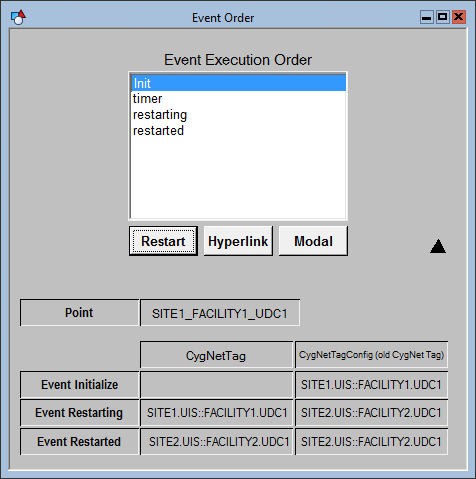
For an example that illustrates how the execution order changes with various types of calls (timers, hyperlinks, modal, etc.), open Event Order.csf in the APPS SCREXAMP folder or in the \Clients\CStudio\Screens\Examples folder.


